Programming in JavaScript – Week 7 Assignment
Password Generator Application
Starting with the downloadable assignment files, write the Javascript needed for the application. Use the book and lectures as a guide. In this exercise, you’ll develop an application that generates strong passwords of the length entered by the user. The interface looks like this:
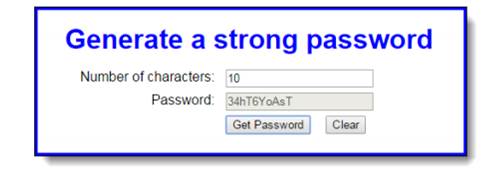
1. Open the HTML and JavaScript files in the week 7 folder.
2. In the JavaScript file, note that the jQuery ready event handler contains three functions: the getRandomNumber() function, the handler for the click event of the Get Password button, and the handler for the click event of the Clear button.
The handler for the Get Password button clears the password text box and has a string variable that contains several characters, but it doesn’t do anything else. The handler for the Clear button resets the text boxes and moves the focus to the first text box.
3. In the handler for the Get Password button, get the value entered by the user and make sure it’s a number. If it isn’t, display an alert dialog box with this message:
“Please enter a valid number”.
4. If the number entered by the user is valid, code a for loop that iterates that number of times. In each iteration of the loop, randomly select one of the characters from the chars variable and concatenate it to the password variable.
5. When the loop is finished, display the password in the password textbox.
Add your first and last name either to the interface or alert box.
Create a document and paste in JS and/or HTML. Comment each code section with a detailed description of what it does. Zip all files for submission. Add a screenshot of the running application on your computer showing the time/date on your screen at the time of testing.