Computer Applications
for Business – Week 7 Assignment
MS Excel: Querying (Web)
Start with a new spreadsheet in Microsoft Excel online or installed version of Microsoft Excel with no template applied. A template is not allowed for assignment.
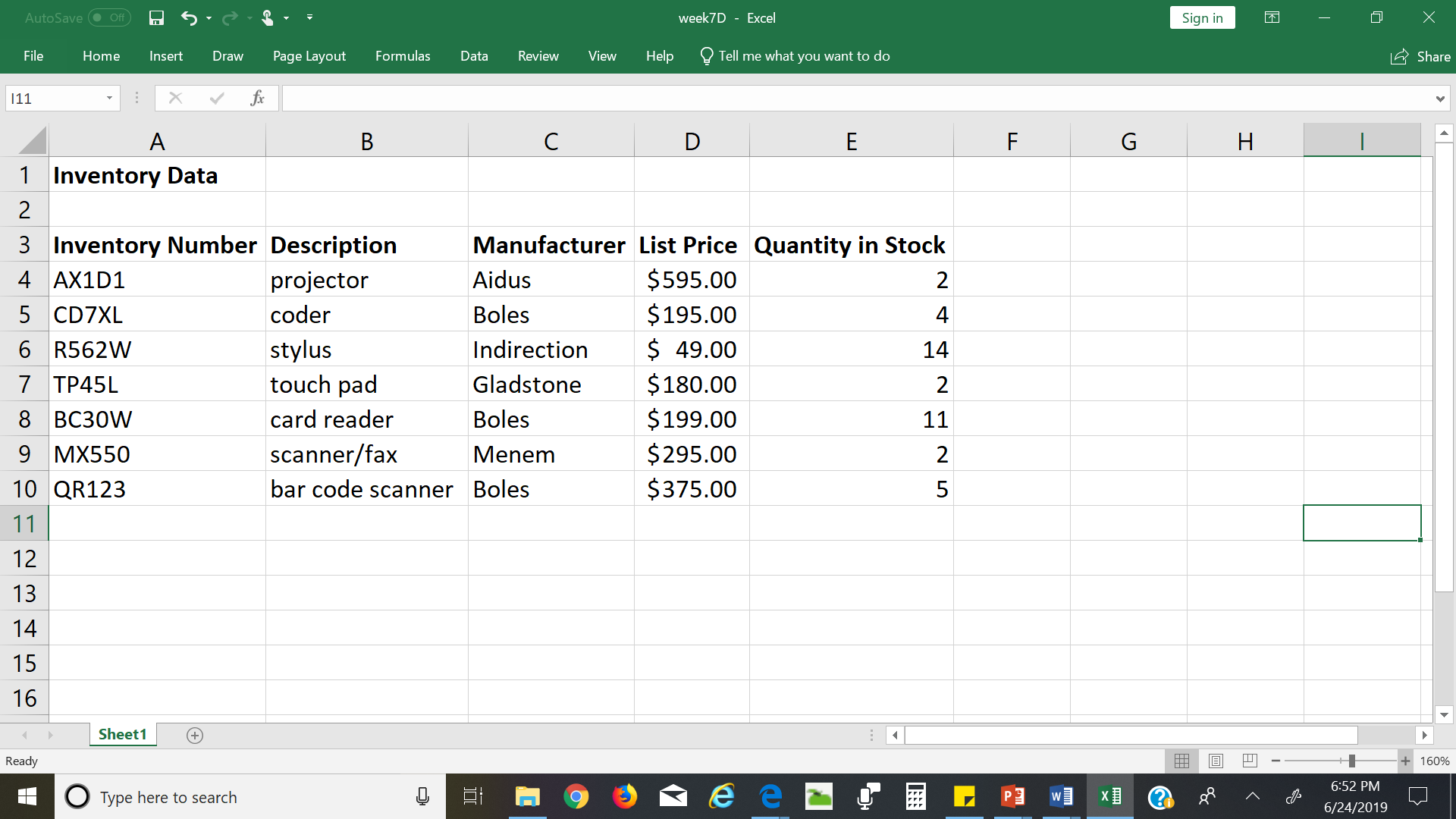
A local company would like to be able to search their inventory in an easy manner. They have given you data in table above, then:
· Create the table above in excel.
o Add two more rows of inventory data of your choice.
o Format the column headings to be bold.
o In Cell A14 put your name and GID number
· Save workbook before filters as CS155Week7LastnameFirstName.
o Ensure you use your own lastname and firstname in filename.
·
Perform the following filters.
o
All
inventory items with more than 10 in stock.
§
Save as
CS155Week7ALastnameFirstName
o
All
inventory items from the manufacturer, Boles.
§
Save as
CS155Week7BLastnameFirstName
o
All
inventory items under $100.
§
Save as
CS155Week7CLastnameFirstName
o
All
inventory items with 5 or less in stock and a list price of less than $300.
§
Save as CS155Week7DLastnameFirstName
Five files will be
attached and submitted in one submission
·
File one
–Saved before beginning extractions. Save as CS155Week7LastnameFirstName
·
File
two—Saved after Filter A. Save as CS155Week7ALastnameFirstName
·
File
three— Saved after Filter B. Save as CS155Week7BLastnameFirstName
·
File
four-- Saved after Filter C. Save as CS155Week7CLastnameFirstName
·
File
five-- Saved after Filter D. Save as CS155Week7DLastnameFirstName